
Updates buried in chats
Important details disappear inside WhatsApp, Instagram, calls, and informal conversations.
Take the load off your workflow.
LoadOff builds lightweight business systems that reduce busywork, clarify decisions, and keep work moving.
For owner-led businesses managing work through WhatsApp, Instagram, calls, sheets, manual follow-ups, and staff memory.
Workflow leaks
Most growing businesses do not break because people are careless. Work breaks when updates, ownership, follow-ups, and decisions are scattered across too many places.
Important details disappear inside WhatsApp, Instagram, calls, and informal conversations.
Leads and customer conversations go cold when no system preserves context or reminds the right person.
Owners waste time asking what happened, who handled it, and what is still pending.
Tracking starts simple, then turns into duplicate rows, unclear stages, and outdated information.
Work slows down when no one clearly owns the next action, update, approval, or handover.
Decisions get delayed when numbers and updates have to be collected and interpreted manually.
What we improve
These are the areas where LoadOff helps turn repeated business work into lightweight systems with clear inputs, ownership, status, reminders, and visibility.
For teams repeating the same updates, reminders, entries, and copy-paste work every day.
Reduce repetitive copying, updating, reminding, sorting, and moving information between tools.
For owners who need to know what is pending, delayed, missed, or urgent without asking everyone.
Give owners a clearer view of pending work, lead status, follow-ups, team activity, and bottlenecks.
For owners who have information everywhere but still do not know what to fix or follow up first.
Turn scattered data into summaries, reports, scores, and signals that show what needs attention.
For teams where responsibility, status, handovers, approvals, and next actions are unclear.
Clarify who owns what, what is pending, what is overdue, and what should happen next.
For businesses losing inquiries because leads and follow-ups stay scattered across channels.
Capture, organize, assign, follow up with, and revive leads so serious inquiries do not get lost.
Where to start
Start with one focused workflow instead of trying to automate the whole business at once. These are focused starting systems, not fixed software products.
Working demo
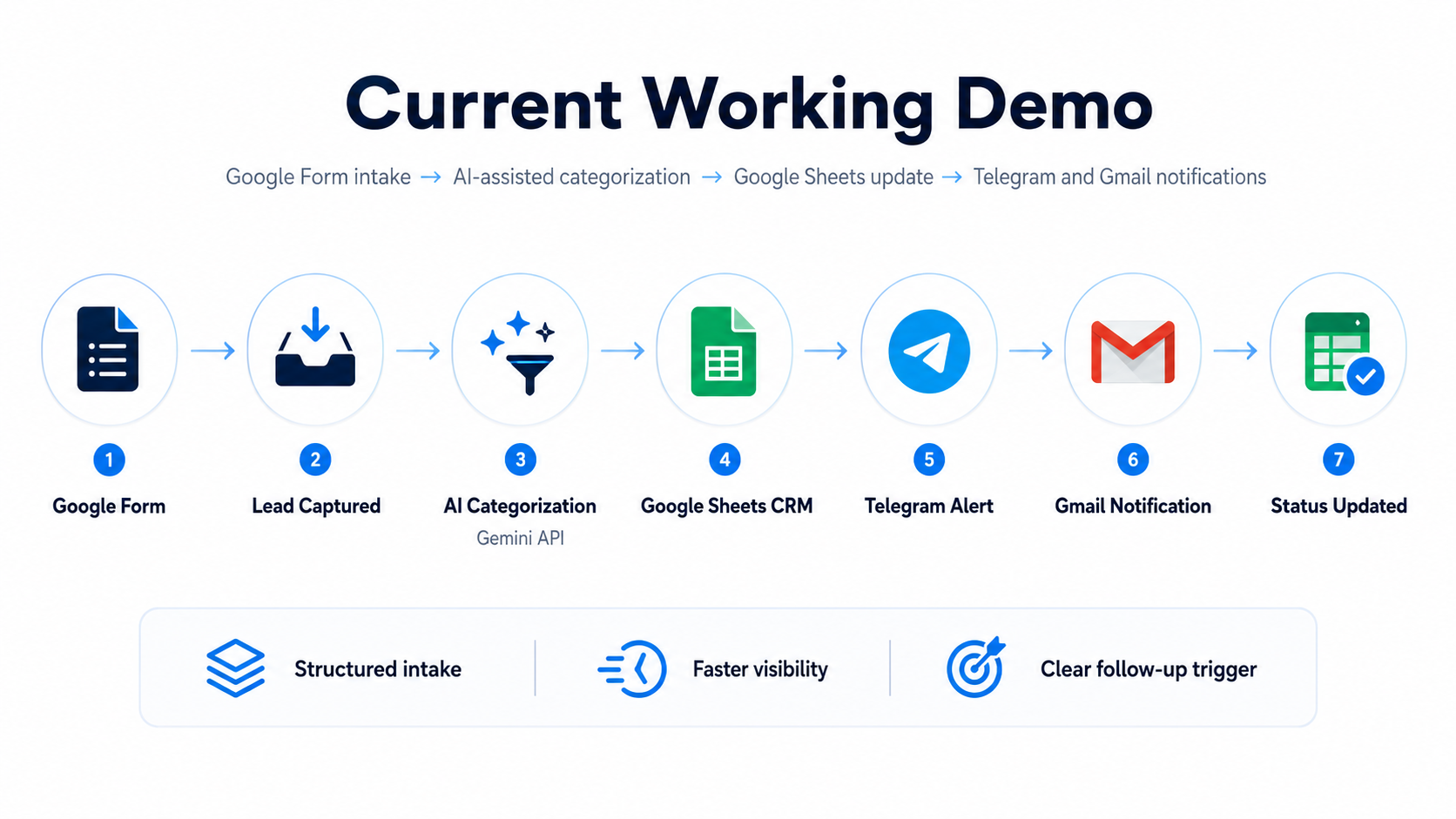
This working demo shows how a lead can move from intake to tracking, categorization, notification, and follow-up visibility.
Example stack: Google Forms, Google Sheets, Make.com, AI-assisted categorization, Gmail or Telegram notifications.
How we build
We map the workflow before automating so the system has clear inputs, states, triggers, owners, outputs, and failure handling.
Understand the current process, tools, staff roles, bottlenecks, and repeated work.
Define inputs, statuses, ownership, handoffs, triggers, outputs, and failure points.
Decide what should be tracked, automated, notified, reported, or escalated.
Build the lightweight system and test normal cases, edge cases, and messy real-life cases.
Refine the system during early use so it fits how the business actually works.
Keep the system checked, adjusted, and useful after it becomes part of daily operations.
Simple starting points
Choose a starter system for one clear workflow, move to growth when ownership and visibility need more structure, or request a custom system for complex operations.
Monthly monitoring is available when the workflow becomes part of daily operations.
One focused workflow such as lead tracking, quick capture, task reminders, basic reports, or order status.
A fuller system with ownership, statuses, reminders, escalation views, dashboards, and launch support.
Priced by process complexity, tools, volume, integrations, dashboards, and support needs.
FAQ
No. Lead handling is one strong use case, but LoadOff also builds systems for reporting, reminders, order tracking, staff tasks, approvals, owner dashboards, business memory, and repetitive workflow control.
We build lightweight operating systems around real business workflows. That can mean trackers, forms, dashboards, reminders, escalation views, SOPs, reports, templates, and simple automations connected around one clear process.
Start with a Workflow Review. We look at how work currently moves, where it gets delayed or forgotten, and recommend the simplest first system instead of forcing you to choose from a confusing service list.
We understand your current process, identify repeated manual work, missed updates, unclear ownership, scattered information, and practical automation opportunities. The output is a clear fix-first recommendation.
Yes, but tools are the hidden implementation. Depending on the workflow, we may use Google Sheets, Forms, Apps Script, Make, n8n, dashboards, alerts, or AI-assisted categorization and summaries. The offer is the system outcome, not the tool stack.
No. LoadOff is meant to reduce repeated manual updates, make ownership clearer, and help people respond faster. The system supports the team; it does not pretend to run the business without people.
Yes, if the channel access allows it. Where direct integration is limited, we can still create quick-capture forms, manual entry flows, screenshot upload workflows, templates, trackers, and reminders so important context does not stay buried.
Yes, when the context is captured through a supported channel, manual entry, export, or structured tracker. LoadOff can build customer memory and follow-up recovery systems that summarize previous context, log revival messages, and hand active leads back to the owner with the story remembered.
Choose Starter for one focused workflow, Growth when you need dashboards, reminders, ownership, and escalation across a fuller process, and Custom when the workflow has multiple teams, tools, branches, or unusual complexity.
Simple starter systems can often be planned and built quickly once the workflow is clear. Larger systems depend on process complexity, number of trackers, integrations, dashboards, and review cycles.
Monthly monitoring can include workflow checks, small fixes, minor changes, usage review, reminder adjustments, and simple performance summaries. New workflows or major changes are quoted separately.
Yes. The goal is not to force a new complicated process. We first understand how your business already works, then clean up the parts where information, ownership, reminders, or reporting are breaking down.
We keep the setup practical and permission-aware. Access, tools, and data handling should be decided based on what the workflow actually needs, and sensitive customer or business information should only be shared where it is required for the system to work.
Workflow Review
Send us your current process. We will identify repetitive steps, manual bottlenecks, and practical automation opportunities.
loadoffautomations@gmail.com